|
|
Latest Articles

New Movies




Foreign


|

Torrent Description
Apple » Apple Macintosh » Другие программы (Mac OS)
iMazing Год выпуска: 13 Октября 2020 Версия: 2.12.4 (13847) Разработчик: DigiDNA SARL. Платформа: Intel Язык интерфейса: Мультиязычный (Русский присутствует) Таблетка: Вылечено. K'ed TNT Системные требования: • OS X 10.9 или более поздняя версия. • Любой 64-разрядный Intel ® Mac. • iTunes 12.2.0 or later • iOS 4.0 or later Описание: iMazing (был DiskAid) - лучший менеджер устройств iOS с возможностями, намного превосходящими возможности iTunes. С iMazing и вашим устройством iOS (iPhone, iPad или iPod) вы можете: Копируйте музыку на любое устройство iOS (даже с одного устройства iOS на другое!) Независимо от того, c каким Mac или ПК это устройство уже синхронизировано; это музыкальная копия. Резервное копирование и восстановление отдельных приложений iOS и ваших пользовательских сохраненных данных идеально подходит для освобождения места на вашем устройстве iOS без потери файлов (или прогресса в игре) или для копирования приложения как есть на другое устройство iOS Перенос файлов на устройство iOS и с него и просмотр файловой системы iOS Используйте ваше устройство iOS как внешний диск Просматривайте и сохраняйте сообщения (SMS, MMS, iMessage), голосовую почту и журналы вызовов, что не может сделать iTunes Просматривайте, сохраняйте и добавляйте контакты на свой iPhone, не добавляя их автоматически в свою учетную запись iCloud Управление несколькими резервными копиями на одном устройстве iOS и восстановление с любого из них (аналогично Time Machine для iOS) И другие удивительные вещи, которые вы никогда не считали возможным! [spoiler="Процедура установки:"] • Смонтировать образ и ознакомиться с Help.txt почему именно так.. • Дальше на выбор, установка как обычно (перетащить иконку приложения в папку "Программы/Applications") или с помощью Open Gatekeeper friendly. • Программу не обновлять! [/spoiler] [spoiler="Что нового"] What's New Version: 2.12.4 (13847) Release date: Tue, 13 Oct 2020 12:25:33 +0200 Fixes and improvements • Fixed iMazing Mini occasionally hanging on recent macOS Catalina versions • General stability improvements following sanitized retrieval of disk usage metrics • Full Release Notes are available here [hr] Release date: Wed, 25 Mar 2020 13:22:05 +0100 Version 2.11.2 (13553): • Full Release Notes are available here [hr] Release date: Fri, 06 Mar 2020 15:56:21 +0100 • Full Release Notes are available here Version: 2.11.1 (13478) What's New in iMazing 2.11 Photos The Photos section has been rebuilt from the ground up. The Camera section has been removed and integrated to Photos. • Vastly improved loading times • Preview photos in high resolution • Access detailed information about each photo and video • Preview and export other versions of a photo or video: pre-portrait mode asset, originals of edited items, image and video components of Live Photos • Customize exports with powerful options • Full screen mode Learn more: • Learn all about the new Photos section here. New Dataset: Profiles This one is for sys-admins, developers and geeks: • View configuration and provisioning profiles of iOS devices • Install, export and remove profiles • Manage a library of profiles Learn more: • Learn all about the Profiles view here. Tools Menu iMazing packages three smaller utilities which you can open from the new Tools menu: • iMazing Mini is our menu bar app which handles automatic backups. It hasn't changed, but is now opened via the Tools menu instead of the backup icon in iMazing's top toolbar. • iMazing HEIC Converter is our popular HEIC to JPEG conversion tool, now available within iMazing too. • iMazing Profile Editor is our new Apple Configuration Profiles editor, also available on the Mac App Store as a standalone app. Learn more: • Getting Started with iMazing Mini • Convert HEIC to JPEG with iMazing HEIC Converter • Getting Started with iMazing Profile Editor Configurator Menu iMazing 2.11 includes a new set of tools designed for sys-admins to manage and provision fleets of iOS devices. If you are not interested, you can select the Hide this menu option of the Configurator menu to remove it altogether from iMazing's menu bar. Learn more: • Getting Started with iMazing Configurator Improvements in 2.11.0 • Backup: improved the Repair Backup feature to handle more edge cases • iMazing Mini: reduce the frequency of disk accesses to allow NAS and other external drives to sleep more often • Messages: threads with different recipients (email and phone number) for the same contact are now merged • Messages and WhatsApp: added more info in TXT exports: time stamp, contact name etc. Fixes in 2.11.1 • French localization fixed. Toutes nos excuses à nos utilisateurs francophones. Fixes in 2.11.0 • Automatic Backup: fixed a rare issue where an operation could run multiple times • Backup: fixed an issue which could cause slower backups on certain configurations • Contacts: fixed importing contacts to empty address book on devices running iOS 13.2 and above • Photos: handling of new permissions required to delete photos in macOS 10.15.3 • Transfer to device: improved available space checks before transferring data [/spoiler] [spoiler="Невозможно запустить программу из-за повреждения"] Читаем внимательно Gatekeeper Коротко: Откройте Системные настройки > Защита и безопасность > Общие, и сделайте как на скрине. 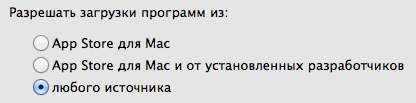 [/spoiler] [spoiler="Скриншот окна About"]  [/spoiler] [spoiler="Скриншоты"]    [/spoiler]
Related Torrents
|
|||||||||||||||||||||||||||||||||||||||||||||||||||||||||||||||||||||||||


Home - Browse Torrents
ExtraTorrent.st is in compliance with copyrights
2025 ExtraTorrent.st