|
|
Latest Articles

New Movies





Foreign





|

Torrent Description
 Apple » Apple Macintosh » Системные программы (Mac OS) MacPilot [hr] Год выпуска: 2010 Версия: 5.0.1 Разработчик: Koingo Software Платформа: PPC/Intel universal Системные требования: Mac OS X 10.5 или новее Язык интерфейса: только английский Таблэтка: Не требуется [hr] Mac Pilot позволяет управлять более чем 300 скрытыми функциями Mac OS X, обычно доступными только через терминальные команды. Возможности этой программы будут полезны как средним пользователям, так и IT-специалистам: при помощи нее можно менять скрытые настройки Finder, Dock, Safari, установки сети, шрифтов и т.д. Еще больше опций, еще больше возможностей! [spoiler="Изменения в версиях с 4.0.9 по 5.0.1"] [spoiler="Изменения в версии 4.0.9"] Bug Fix Can now set Finder options when the Finder interface level is set to Simple. Launch Services now uses new code for 10.5 and 10.6. No longer uses Smart Crash Reports, and instead uses an in-house option. Numerous core-level bug fixes involving basic functionality across all Koingo applications. [/spoiler] [spoiler="Изменения в версии 4.1"] Compatibility This version of MacPilot is designed for Mac OS X 10.5 and 10.6; however, while unsupported, it should still run on Mac OS X 10.4. Bug Fix Fixed some crashes when doing a root operation with progress status updates. Confirmation dialogs now respond to the escape key. Corrected issue with order link not adding item to the user’s shopping cart. Fixed issue with clickable checkbox area in the main window. [/spoiler] [spoiler="Изменения в версии 4.1.1"] Bug Fix Fixed some more crashes when doing a root operation with progress status updates. All lists now sort numerically if possible first. Fixed calculating line heights. [/spoiler] [spoiler="Изменения в версии 4.1.2"] Fixed Sparkle updating. [/spoiler] [spoiler="Изменения в версии 4.1.3"] New Feature Disable the Spotlight menu in Mac OS X 10.6. Unused prefs checker now displays relative time. Now checks last access date when scanning for unused prefs. Bug Fix Rebuilding/updating Launch Services on Snow Leopard fixed. Using some special characters in passwords for authentication is now fixed. Setting SMS for Battery is now fixed. Fixed textured button drawing. Now restores proper sysctl.conf for Snow Leopard. Modification Using texturedbuttons instead of bevelbuttons. Will now only ask for an admin password every time if performing an operation which returns feedback as it operates (ie. rebuilding launch services db) [/spoiler] [spoiler="Изменения в версии 4.1.4"] Bug Fix Fixed CoverFlow background color so it’s a float not a boolean, allowing a range of greys to be used. Now supports UTF8 in the MacPilot database. Modification Safari 4 Beta-only features are now hidden. Fixed sub-categorization of all Finder checkboxes. Removed 4 Finder view-option restriction preferences that Apple removed from 10.6. Modification Finder ‘Animate Get Info window panes’ is now hidden from Snow Leopard users as Apple removed the ability to set this feature. ‘Animate snapping to grid’ is now hidden from Snow Leopard users as Apple removed the ability to set this feature. updated the Disable All animations feature to note that it does not disable the snap to grid animation. ‘Click-through destroys selection’ help text updated to explain how it works. Updated name for ‘AutoStopWhenScrollingOffBounds’ feature. Modification Dock moved Expose preference out to Expose category [/spoiler] [spoiler="Изменения в версии 4.1.5"] Bug Fix Fixed bug when a UtilityButtonBar button would close a window [/spoiler] [spoiler="Изменения в версии 4.1.6"] New Feature Character Map completely revamped. Modification Added warning about booting to Safe mode. Removed Disk Images pref pane from 10.6. Bug Fix Fixed problem setting power events. Fixed problem viewing font characters which have a width of zero. [/spoiler] [spoiler="Изменения в версии 4.1.7"] Bug Fix Fixed setting the login window desktop picture on Mac OS X 10.5 and later. [/spoiler] [spoiler="Изменения в версии 4.1.8"] New Feature Increase main list font sizes in the Preferences window. New Feature Spaces Swoosh Animation New Feature iTunes Hide Ping Dropdown Disable Ping Sidebar New Feature Exposé Disable Exposé New Feature Safari Features Encoding Detector enabled New Feature System Appearance Default icon size in “Open” dialogs Default icon size for “Save” dialogs New Feature System Behavior Force Magic Trackpad auto orientation New Feature Colloquy Show Dock badge Chat view organization type [/spoiler] [spoiler="Изменения в версии 4.1.9"] New Feature System Help Viewer Use normal instead of floating window on 10.5 Use normal instead of floating window on 10.6 New Feature Safari Features DNS Prefetching [/spoiler] [spoiler="Изменения в версии 4.2"] New Feature Preferences option to auto-close the command completed dialog boxes if there were no errors. Bug Fix No longer shows two trial dialogs on launch (does not apply to the App Store copy). [/spoiler] [spoiler="Изменения в версии 4.2.2"] Bug Fix Fixed plugin bug. Fixed loading New Features category. [/spoiler] [spoiler="Изменения в версии 4.3"] New Feature Login Window General Desktop Picture Desktop Picture Reset New Feature General Disable send and reply animations Disable reply animation New Feature System Behavior Allow "Don't Save" Command-D in save dialogs Character accent menu New Feature Safari "Resume" Safari when it is relaunched New Feature QuickTime Player "Reusme" QuickTime Player when relaunching New Feature Preview "Resume" Preview on relaunch New Feature System Appearance Window zoom animations when opening New Feature Toggle visibility of Library folder. Bug Fix Special commands that require admin (gold icon) permissions now request admin auth to set. Numerous fixes for Mac OS X 10.7 Lion. Fixed typo in system information tab. Fixed the startup options to allow setting a normal boot mode. [/spoiler] [spoiler="Изменения в версии 4.3.1"] New Feature Can now select multiple files in lock/visibility tools. Bug Fix Miscellaneous Lion fixes Fixed a few typos Removed iCal event duration for Mac OS X 10.7 as Apple removed this feature. Corrected issue with admin authorization being requested. Can now set site icon mode for Safari 5 [/spoiler] [spoiler="Изменения в версии 4.3.2"] New Feature Can now select multiple files in lock/visibility tools. Bug Fix Manual pages now load correctly. Miscellaneous Lion fixes Fixed a few typos Removed iCal event duration for Mac OS X 10.7 as Apple removed this feature. Corrected issue with admin authorization being requested. Can now set site icon mode for Safari 5 [/spoiler] [spoiler="Изменения в версии 4.3.3"] Были недоступны после выпуска данной версии [/spoiler] [spoiler="Изменения в версии 4.3.4"] [*] Bug Fix: Fixed a few small crashes and bugs in OS X 10.8 Mountain Lion. [/spoiler] [spoiler="Изменения в версии 5.0"] [*] New Feature: Now Cocoa app for Mac OS X 10.6 and later. [*] New Feature: Time Machine: Backup interval [*] New Feature: Address Book: General: Card DAV Plugin Debugging Enabled [*] New Feature: Address Book: General: Card DAV Plugin Log Connection Details [*] New Feature: Address Book: General: Interface layout [*] New Feature: Address Book: General: Text size [*] New Feature: Acorn: Show all CI Filters [*] New Feature: Acorn: Show smart export [*] New Feature: Acorn: Show boolean options contextual menu [*] New Feature: Acorn: Use alternative text rendering path [*] New Feature: Adium: Disable "tab scrubbing" [*] New Feature: Adium: Use client login with proxies [*] New Feature: Adium: Allow rubberband scrolling [*] New Feature: Aperture: Add URL to photo in the IPTC caption [*] New Feature: BBEdit: Files: Generate an "ALT" attribute with the file's name when dropped into HTML [*] New Feature: BBEdit: Files: Generate a width and height attributes for files when dropped into HTML [*] New Feature: BBEdit: General: Surf Prev/Next operates in display order [*] New Feature: BBEdit: Files: Always show file list [*] New Feature: BBEdit: General: Use distinct colors for HTML attributes and values [*] New Feature: BBEdit: General: Show anonymous functions in JavaScript [*] New Feature: BBEdit: General: Show anonymous functions in ActionScript [*] New Feature: BBEdit: General: Make temp project for folder open [*] New Feature: BBEdit: Files: Always ask for unknown file encodings [*] New Feature: BBEdit: General: Balance Includes Delimiters [*] New Feature: BBEdit: General: Translated HTML paragraphs on separate lines [*] New Feature: BBEdit: General: Report "Replace All" Results [*] New Feature: Colloquy: Auto join rooms wait for successful identification [*] New Feature: Colloquy: Tab completion string [*] New Feature: Colloquy: Warn on large message threshold [*] New Feature: Colloquy: Warn on large messages [*] New Feature: Curio: General: Keep CRLF in Text Outline Exporter [*] New Feature: Curio: General: Quick render support [*] New Feature: Curio: General: Display year in adornment [*] New Feature: Curio: General: Promised files delay [*] New Feature: Curio: Shortcuts: Show Inspector Shortcut [*] New Feature: Curio: Shortcuts: Inspector Backward Shortcut [*] New Feature: Curio: Shortcuts: Select Tool Shortcut [*] New Feature: Curio: Shortcuts: Figure Tool Shortcut [*] New Feature: Curio: Shortcuts: Text Tool Shortcut [*] New Feature: Curio: Shortcuts: Line Tool Shortcut [*] New Feature: Curio: Shortcuts: Brush Tool Shortcut [*] New Feature: Curio: Shortcuts: Eraser Tool Shortcut [*] New Feature: Curio: Shortcuts: Override Cursor Shortcut [*] New Feature: Curio: Shortcuts: Edge Snap Shortcut [*] New Feature: Curio: Shortcuts: Shadow Shortcut [*] New Feature: Curio: Shortcuts: Center Snap Shortcut [*] New Feature: Curio: Shortcuts: Rotate Counterclockwise Shortcut [*] New Feature: Curio: Shortcuts: Rotate Clockwise Shortcut [*] New Feature: Curio: Shortcuts: Zero Rotation Shortcut [*] New Feature: Curio: Shortcuts: Natural Bounds Shortcut [*] New Feature: Curio: Shortcuts: Grid Snap Shortcut [*] New Feature: Curio: Shortcuts: Grid Drawn Shortcut [*] New Feature: Curio: Shortcuts: Quick Zoom Shortcut [*] New Feature: Curio: Shortcuts: Decrease Pen Size Shortcut [*] New Feature: Curio: Shortcuts: Increase Pen Size Shortcut [*] New Feature: Curio: General: Disable rotate gesture [*] New Feature: Cyberduck: Connection: Swift URL appendage [*] New Feature: Cyberduck: Archives: Create tar command [*] New Feature: Cyberduck: Archives: Create tar.gz command [*] New Feature: Cyberduck: Archives: Create tar.bz2 command [*] New Feature: Cyberduck: Archives: Create zip command [*] New Feature: Cyberduck: Archives: Expand zip command [*] New Feature: Cyberduck: Archives: Expand tar.bz2 command [*] New Feature: Cyberduck: Archives: Expand tar.gz command [*] New Feature: Cyberduck: Archives: Expand tar command [*] New Feature: Cyberduck: Connection: Allow STAT for directory listings [*] New Feature: Cyberduck: Connection: Allow LISTA for directory listings [*] New Feature: Cyberduck: Connection: Allow MLSD for directory listings [*] New Feature: Cyberduck: Connection: Send extended LIST command [*] New Feature: Cyberduck: General: Use ODB editor support instead of simple file monitoring [*] New Feature: Cyberduck: General: Enable debug logging [*] New Feature: Cyberduck: General: Terminal bundle identifier [*] New Feature: Cyberduck: General: Terminal command [*] New Feature: Cyberduck: Connection: Default bucket ACL [*] New Feature: Cyberduck: Connection: SSH Command [*] New Feature: Cyberduck: Interface: Browser font size [*] New Feature: Cyberduck: Connection: Files to skip during upload [*] New Feature: Cyberduck: Connection: WebDAV NTLM Domain [*] New Feature: Cyberduck: Connection: Check hostnames [*] New Feature: Cyberduck: Connection: S3 default metadata [*] New Feature: Cyberduck: Connection: Ask to switch to SFTP if available [*] New Feature: Cyberduck: Connection: Review open connections upon quit [*] New Feature: Cyberduck: Connection: HTTP compression [*] New Feature: Disk Utility: General: Show unsupported networks [*] New Feature: Disk Utility: General: Simple interface [*] New Feature: Disk Utility: General: Remote connections allowed [*] New Feature: Disk Utility: General: Debug message logging level [*] New Feature: Disk Utility: General: Simulate running from Installer CD [*] New Feature: Disk Utility: General: Simulate SMART Error on Disk Number [*] New Feature: Disk Utility: General: Allow disk images as RAIDs [*] New Feature: Disk Utility: General: Show details in first aid [*] New Feature: Disk Utility: General: Use time estimates for disc recording [*] New Feature: Disk Utility: General: Show file recovery warning [*] New Feature: Disk Utility: General: Allow skipping of disc verification [*] New Feature: System: Behavior: Disable automation termination [*] New Feature: System: Appearance: Allow rubberband scrolling effect [*] New Feature: Safari: Behavior: Backspace key goes to previous page [*] New Feature: Preview: Auto-save enabled [*] New Feature: TextEdit: Auto-save delay [*] New Feature: Finder: Interface: Preferred view style [*] New Feature: Finder: Features: Show warning when changing file extension [*] New Feature: Dock: Appearance: Auto-hide speed [*] New Feature: Dock: Appearance: Auto-hide delay [*] New Feature: Mission Control: Animation duration [*] New Feature: System: Launchpad: Springboard hide duration [*] New Feature: Mission Control: Double tap to jump back [*] New Feature: Finder: Features: Path bar is relative to home directory [*] New Feature: Mission Control: Window cluster scaling [*] New Feature: Finder: Interface: Show path to current desktop picture on desktop [*] New Feature: Preview: Scale images by default when printing [*] New Feature: Preview: Auto-rotate by default when printing [*] New Feature: Tons more network info. [*] New Feature: Take selected files out of download quarantine. [*] New Feature: Clear Entire Print Queue. [*] New Feature: Restart Dock or Finger manually. [*] New Feature: Print Manual Pages. [*] New Feature: Character Map now shows nice font previews in the list. [*] New Feature: Added Font menus into the General pane. [*] New Feature: Updated network optimization presets to modern values. [*] New Feature: Less common features in the General pane are now hidden by default. [*] New Feature: Now automatically refreshes disk list when disks mounted or ejected. [*] New Feature: Login Items now are set automatically without the need to click 'Apply Changes'. [*] New Feature: File paths are now shown in the Login Items pane. [*] New Feature: Added Recently Added category to features list. [*] New Feature: Now caches values so the main list does not need to be constantly ping'd for new values when changing the selection. [*] New Feature: Prettier information sidebar. [*] New Feature: Retina/HiDPI support. [*] New Feature: Redesigned the System Information window. [*] New Feature: Added hover-help tags to many items [*] New Feature: Solid State property for Disk info. [*] New Feature: Device Block Size property for Disk info. [*] New Feature: Information in labels can now be selected and copied. [*] New Feature: Now shows root path in the Other pane of the Disks area. [*] Modification: Disks panel layout revamped. [*] Modification: Power panel layout revamped. [*] Modification: Logs panel layout revamped. [*] Modification: Increased font sizes across the board. Apple suggests avoid using the small system font when possible, so we are now doing that. [*] Modification: Removed 'Repair Mac OS 9 Permissions' button from Disks pane. [*] Bug Fix: Now properly reports disk journaling in the Disks tab for the enabled/disabled Journaling button. [*] Bug Fix: Now properly sets the Time Machine Backup Interval on 10.7 and later. [*] Bug Fix: Default Volume property in Disks info now shows correct value. [*] Bug Fix: All kJams preferences now set properly. [*] Bug Fix: Fixed bug when refreshing Logs list. [*] Bug Fix: Hibernation mode now works on 10.7 and 10.8. [*] Bug Fix: Buttons properly reset if no manuals come up after a search. [*] Bug Fix: No longer stalls getting system information. [*] Bug Fix: Fixed progress title when disabling journaling on a disk. [*] Bug Fix: Removed ability to set login window picture on Mountain Lion (10.8) as this is no longer programatically safe or easy to do. [*] Bug Fix: Numerous other small bug fixes. [/spoiler] [spoiler="Изменения в версии 5.0"] [*] New Feature: Skip Snapz Pro splash screen [*] Bug Fix: No longer crashes when deleting items in the File Browser. [*] Bug Fix: Should no longer crash when loading login items on some computers. [*] Bug Fix: Should no longer crash when loading disk lists on some computers. [*] Bug Fix: Fixes extracting PowerPC or intel version of an app. [*] Bug Fix: Toggle Library Visibility now works. [*] Bug Fix: Fixed Stationery typo. [*] Note: Login window picture feature removed for 10.7. [/spoiler] [/spoiler] [spoiler="Скриншоты"] 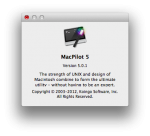 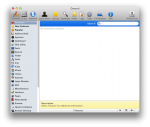 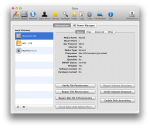 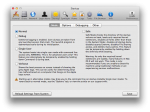 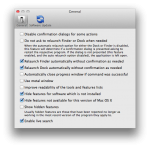 [/spoiler] Раздача будет обновляться по мере выхода новых версий
Related Torrents
|
|||||||||||||||||||||||||||||||||||||||||||||||||||||||||||||||||||||||||


Home - Browse Torrents
ExtraTorrent.st is in compliance with copyrights
2025 ExtraTorrent.st